Reference
Punctuation in braille
Punctuation reuses the same six dots, positioned lower in the cell. Several marks take two cells, and one is genuinely ambiguous with a letter — here is the full set.
| Symbol | Name | Cells | Dots |
|---|---|---|---|
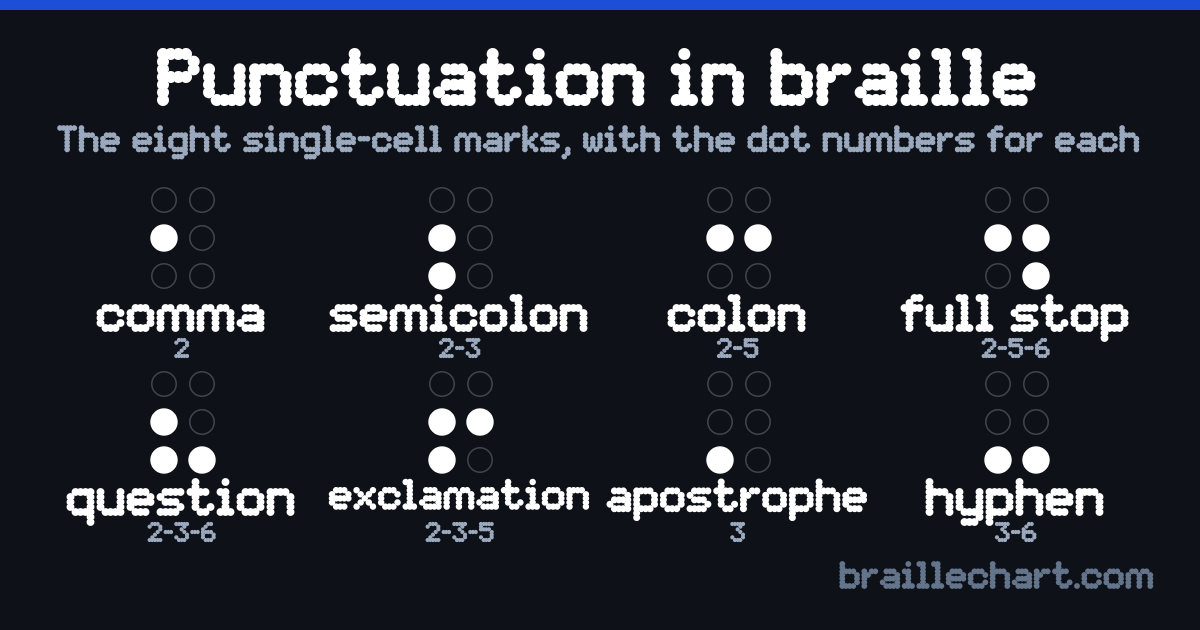
, | Comma | dot 2 | |
; | Semicolon | dots 2 and 3 | |
: | Colon | dots 2 and 5 | |
. | Full stop / period | dots 2, 5 and 6 | |
? | Question mark | dots 2, 3 and 6 | |
! | Exclamation mark | dots 2, 3 and 5 | |
' | Apostrophe | dot 3 | |
- | Hyphen | dots 3 and 6 | |
( | Opening parenthesis | dot 5, then dots 1, 2 and 6 | |
) | Closing parenthesis | dot 5, then dots 3, 4 and 5 | |
/ | Slash | dots 4, 5 and 6, then dots 3 and 4 | |
@ | At sign | dot 4, then dot 1 | |
# | Number / hash sign | dots 4, 5 and 6, then dots 1, 4, 5 and 6 | |
$ | Dollar sign | dot 4, then dots 2, 3 and 4 | |
% | Percent sign | dots 4 and 6, then dots 3, 5 and 6 | |
& | Ampersand | dot 4, then dots 1, 2, 3, 4 and 6 | |
* | Asterisk | dot 5, then dots 3 and 5 | |
+ | Plus sign | dot 5, then dots 2, 3 and 5 | |
= | Equals sign | dot 5, then dots 2, 3, 5 and 6 | |
" | Double quotes | opening is dots 2, 3 and 6, closing is dots 3, 5 and 6 |
Lower-cell shapes
Most punctuation sits in the lower part of the cell — dots 2, 3, 5 and 6 — with nothing in row 1. That is the quickest way to tell punctuation from a letter by touch: if the top row is empty, it is very likely punctuation.
The comma is a single dot 2. The full stop is dots 2-5-6. The question mark is dots 2-3-6.
The quotation mark problem
The opening double quote and the question mark are the same cell in Unified English Braille. Readers resolve it from context — a question mark ends a sentence, an opening quote starts a quotation. This is a real ambiguity in the code, not an error in this table, and it is why automatic braille-to-text decoding cannot be perfectly reliable — the decoder resolves it as a question mark, which is the commoner reading in isolation.
The closing double quote, dots 3-5-6, is unambiguous.
Two-cell symbols
| Symbol | Cells | In a sentence |
|---|---|---|
| ( Opening parenthesis | Braille (invented in 1824) is still in use. | |
| / Slash | Read the and/or clause. | |
| @ At sign | Write to me at name@example.com. | |
| # Number / hash sign | See note #3. | |
| $ Dollar sign | It cost $40. | |
| % Percent sign | Around 10% of readers. | |
| & Ampersand | Marks & Spencer. | |
| * Asterisk | See the footnote *below. | |
| + Plus sign | Add 2 + 2. | |
| = Equals sign | So 2 + 2 = 4. |
Symbols like parentheses, the dollar sign and the percent sign take two cells: a prefix that signals the category, then a shape. The prefix dots 4 or dots 5 do not stand for anything alone — they only modify the cell that follows. The single-cell marks above are not arbitrary either: each is one of the first ten letters shifted down one row, which is why a and the comma share a shape. The same lower cells do double duty as contractions, and the full stop doubles as the decimal point inside a number.
The single-cell marks as one image
The eight marks that take one cell, with their dot numbers. The two-cell symbols are in the table above — a symbol drawn small enough to fit a chart of twenty is not a symbol anyone can read.